 Dynamic Mosaic -
Help Dynamic Mosaic -
Help |
Dynamic Mosaic -
Help
Graphical User Interface
The GUI
has a couple of controls:
In the
next picture all these controsl
are
shown.
Each of
these controls are explained in a dedicated chapter, except
for:
a menu bar
4 action buttons
the dynamics controls
tabs with info and special
tasks
the mosaic
viewer
status bar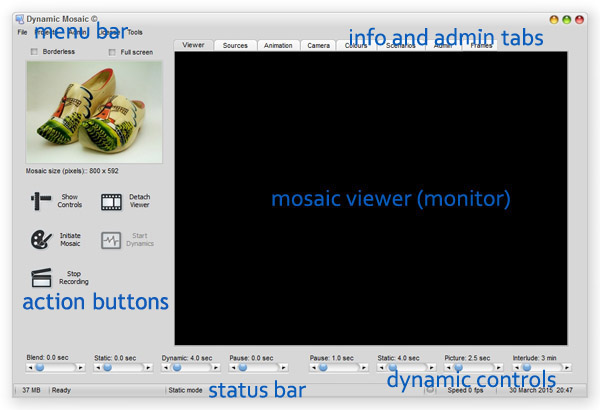
The
mosaic viewer shows the mosaic,
and all the dynamics. This viewer can be detached as a separet window and
dragged into the screen of a second monitor, e.g. the external viewer monitor
in the event, party or fair (etc).
The status bar shows the most relevant status information:
working status ('Ready'), the mode (static, dynamic, etc) a progress bar
(invisible when not used), a gray or red LED when a cam is active, the mosaic
dynamic speed (about 30 frames pers second of an i5 system) and the date and
time.
Borderless
viewer and Full screen
viewer: when these boxes are ticked the viewer is set to these visual settings (no
windows border, and full screen on the (external) monitor.
When the viewer is still attached to the application it will
be detached. In case there is one monitor the viewer might fill the entire screen -
obscuring the interface! In case this happens: press the ESC button to restore to default
size